
Keyword Research
After discovery, UX design, and iterative testing, we brought this critical workflow in-app, enabling users to save time and keep their Pinterest research entirely within Tailwind.
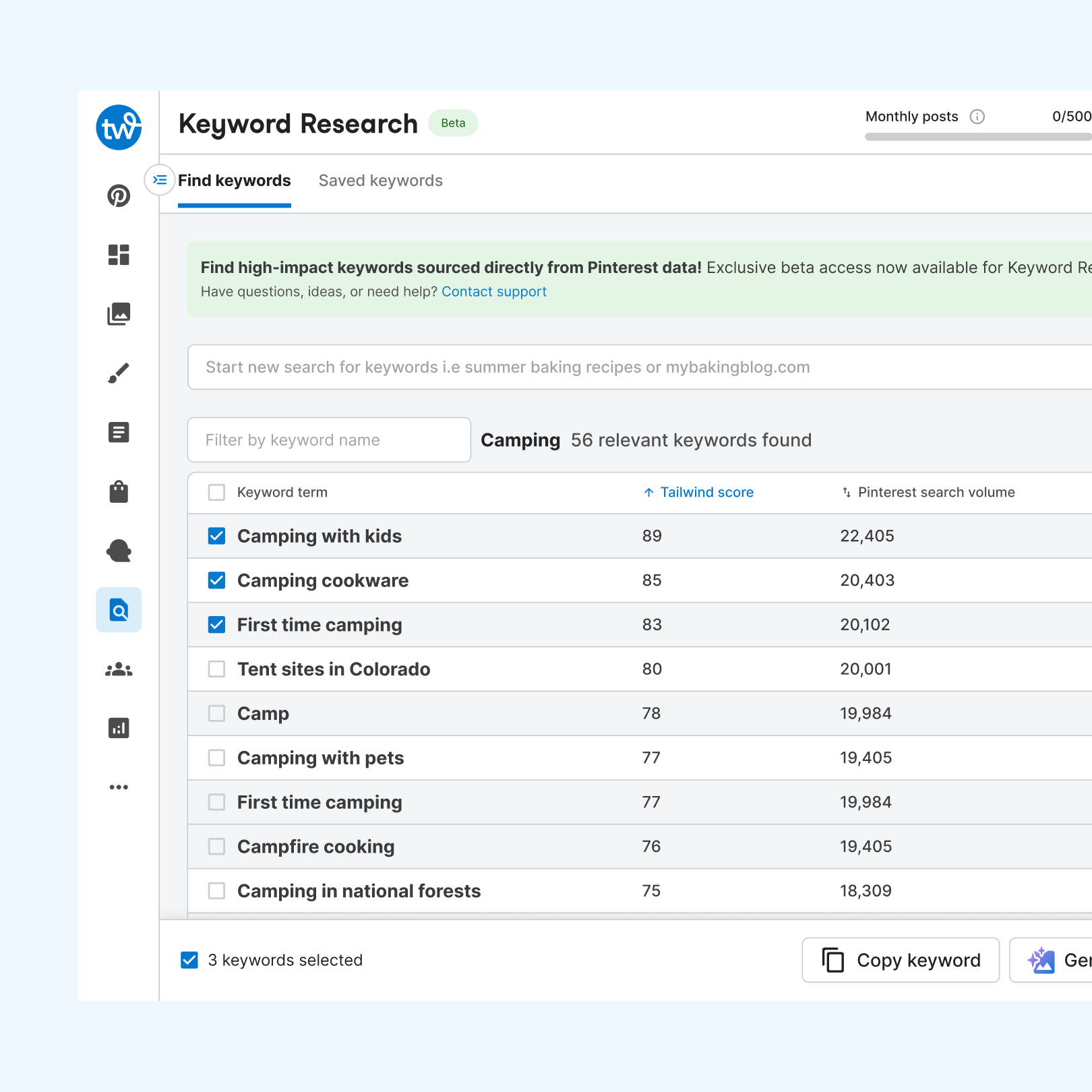
Keywords decide whether Pinterest Pins reach the right audience at the right time. Discovery showed Tailwind users were doing keyword research outside the app, in tools like Pinterest Trends and PinClicks. They kept what they found in spreadsheets, Notion, or Google Drive, then pasted it back into Tailwind's scheduler. The goal was to bring the whole workflow (find, save, recall, and use keywords) into Tailwind to save users time and keep them in-app.
- Product designer for Tailwind's keyword research tool, from discovery through MVP
- Run user interviews to learn how users find and use keywords
- Partnered with a PM on scope and a three-part user flow: the core experience, keywords in the Pin Scheduler, and generating Pin details from a keyword
- Designed, prototyped, and ran usability tests, iterating until feedback turned positive
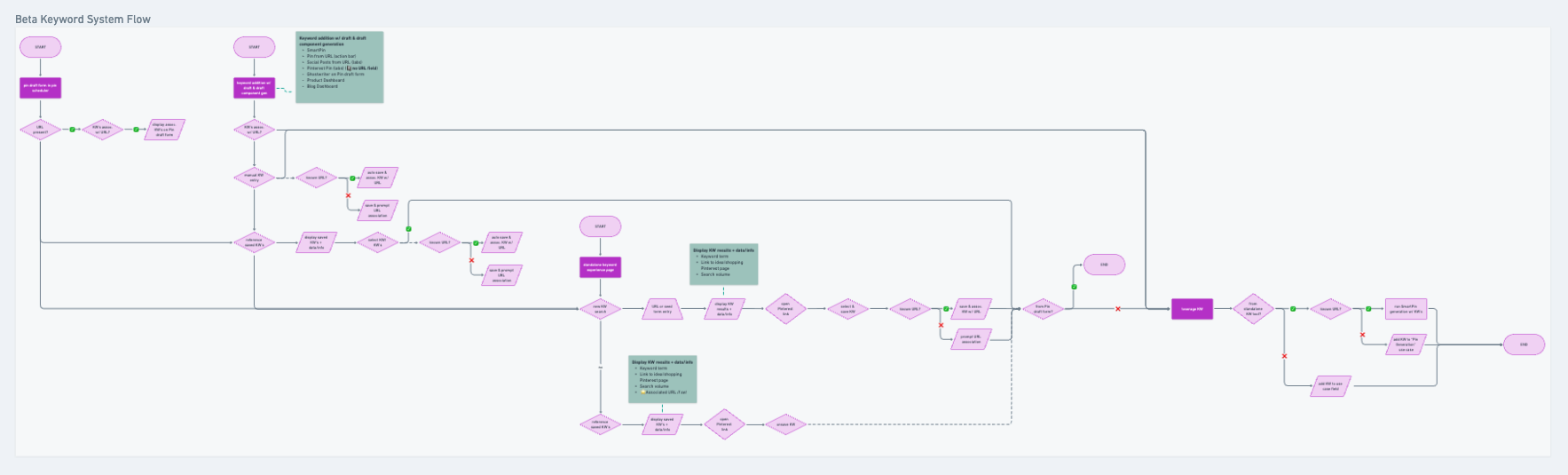
- Core experience first. The feature would eventually reach many parts of Tailwind, so I focused early designs on search, find, save, and manage, built to scale to other touchpoints later.
- Match how users already work. Users added about three keywords per Ghostwriter generation and cared most that at least one made it into the output, which shaped how saved keywords feed Pin titles and descriptions.
- Learn fast. I built a foundational prototype quickly and shared async video walkthroughs so the team could give feedback while I kept designing.
- Generation cut from the MVP. Dropping the flow for generating Pin details from keywords let the team ship about a month sooner. The dashboard alone solved the core pain point of research happening outside Tailwind.

Usability tests surfaced three sources of confusion: testers missed the tool's full value and didn't know where the data came from, didn't understand why they'd pair a URL with a saved keyword, and wanted clearer metrics and faster saving. The next iterations:
- Added an inline banner explaining where Tailwind's keyword data comes from, plus empty states, quick links, and resources that show more of the tool's value
- Reworded URL pairing to explain that it makes saved keywords available across Tailwind, and showed where to find them
- Added multi-select so users can save several keywords at once and act on them right away
- Made metrics like the Tailwind score easier to understand and improved search

- Shipped the keyword research dashboard, bringing a workflow users did outside Tailwind into the app
- Cutting generation from the MVP saved about a month of development time
- Next: bring keyword research into the Pin Scheduler and AI-driven workflows, prioritized by what users do
performed
per user
to saved keyword
If Tailwind provides a cohesive experience in-app that allows users to find, save, recall, and incorporate keywords in their Pins, then we will help users save time and effort, keep them in-app, and help increase the engagement that users receive on Pinterest.
- Conduct discovery work to understand how users do keyword research
- Work collaboratively with a PM to determine scope and core user flow
- Design, iterate, and conduct usability testing to determine overall flow and value for keyword research tool
- Deliver and MVP for users while maintaining a scalable nature that will expand touch points in the future
- Designed the in-app banner that drove adoption of personalized outputs
performed
per user
to saved keyword
Conducting User Research
From user interviews, it became apparent that a large majority of our Pinterest users conduct keyword research in order to find the "right" keywords to plug into their Pinterest Pins before publishing them to go live.
To better understand how our users integrate this workflow into Tailwind, we pivoted our learning objectives to focus on it.
How are users finding top trending keywords?
Most often, users use tools like Pinterest Trends, Pin Inspector, PinClicks, or Pin Generator. This gives the user an idea of what is popular right now and what other users are searching for in real time.
How do they use this information?
From their existing content, or Pins, they can identify which to use. (i.e., a user who sells fabrics searched for trending fabrics and would use this information to promote said fabrics in their inventory.)
Gaps can be identified in their existing Pins to suggest what to promote. If a mental health topic is trending, a therapist blogger can use it as an indicator to create Pins around the topic and seize the opportunity.
Users can see when a good time is to start promoting content. Target audiences might search for Christmas Pins a month before, and users can use this as a cue to ramp up content geared toward Christmas.
What do they do with the keywords once they have them?
They store found keywords in a file or folder, usually Google Drive, Notion, a spreadsheet, or another method. From there, users will pull these keywords into our Pinterest scheduler and plug them into the title, description, or board fields.
How do they use keywords inside Tailwind?
Findings suggest users took their found keywords and generated Pin titles and descriptions in our Ghostwriter tool, an AI-powered Pinterest title and description generator. Important note: users used, on average, three keywords per generation. Users cared less about ensuring all three keywords appeared in the output and more about including at least one keyword.
From Findings to User Flow
Based on our learnings and in collaboration with a Project Manager, we built a user flow to address user needs while aligning the product team on the project's core value-add. The user flow is broken into three sections, and each section includes questions and assumptions I designed around and used as the basis for a research script to ask users once I was ready to test my designs.
1. The core experience
The core experience would include how users can search, find, save, and manage their keyword list within Tailwind.
- What decision points did users have when it came to deciding which keywords to save over others?
- What metrics helped the user make decisions to save a keyword?
- Was it understandable to users the value of adding a URL to a saved keyword?
- Do users know how to find and manage their saved keywords?
2. Keywords in the Pin scheduler
Once a user has done research, how can they easily find and incorporate keywords into their Pinterest Pins?
- How does a user decide which saved keyword to use for a Pin?
- How can the user easily pull saved keywords?
- How can a user easily start keyword research from the Pin scheduler?
3. Generating details from a saved keyword
Saved keywords can be used to generate a full Pinterest Pin with a design, or to generate a Pin title and description.
- What information do users use to determine what keywords to generate?
- How many keywords do they think of using to generate a title and description?
Designing — An Iterative and Collaborative Process
The team had a core hypothesis and a strong user flow, and I was ready to hit the ground running and start laying out concepts. While designing early iterations, I wanted to focus on core ideas and questions to answer during user testing to determine what value users find most important.
Keyword research should scale around the core function of the feature.
The scale at which the team planned to have this feature integrated was massive, touching multiple points within Tailwind. At the beginning, it was important to me to focus on the core experience.
Work fast and discover learnings along the way.
To deliver the highest-quality version, it was imperative to learn what users find most important and which features or ideas we could cut to deliver the fastest value.
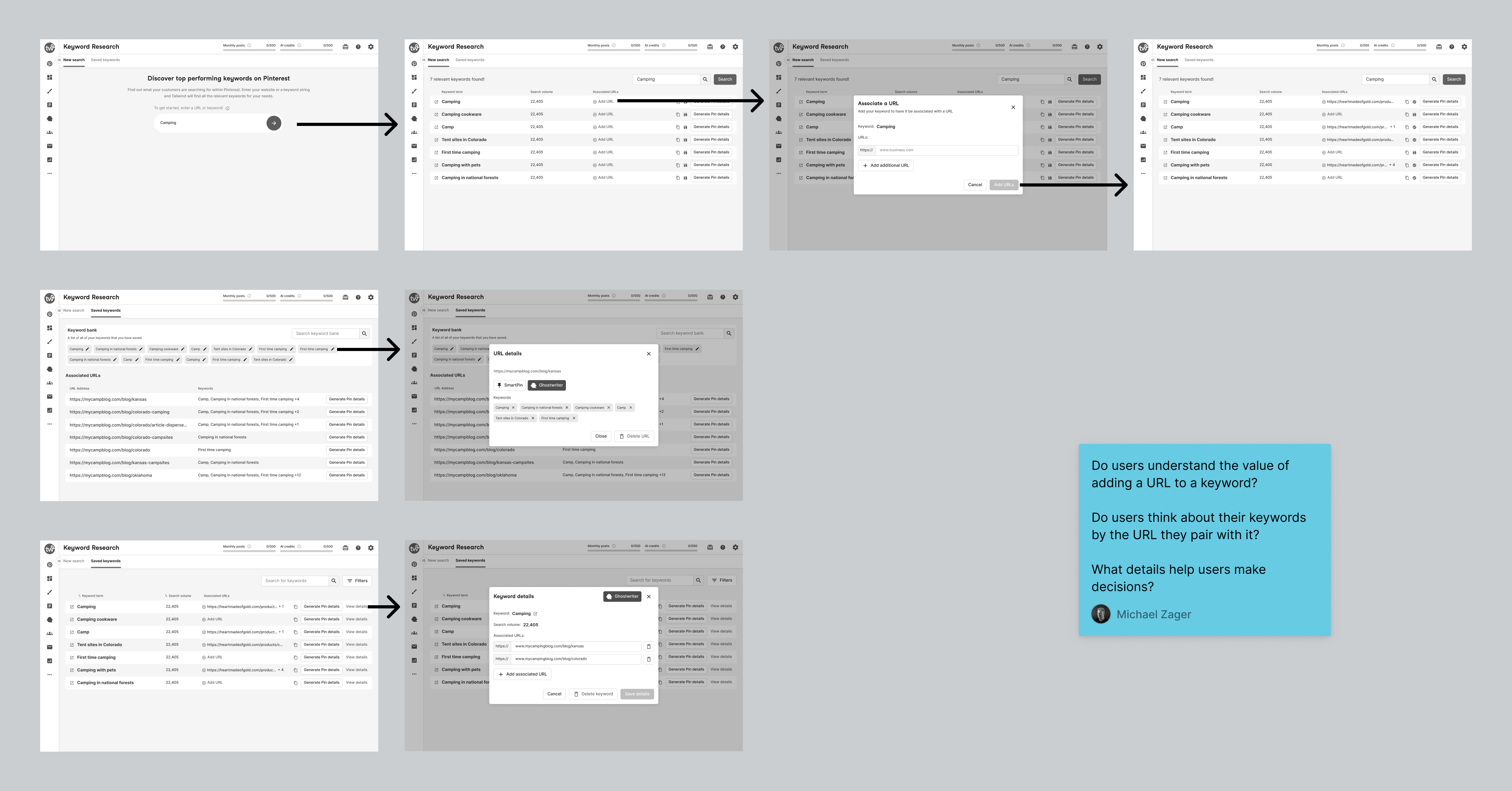
The Core Experience
Wireframe explorations looking at the core interactions a user will need to complete to search, find, and manage saved keywords.
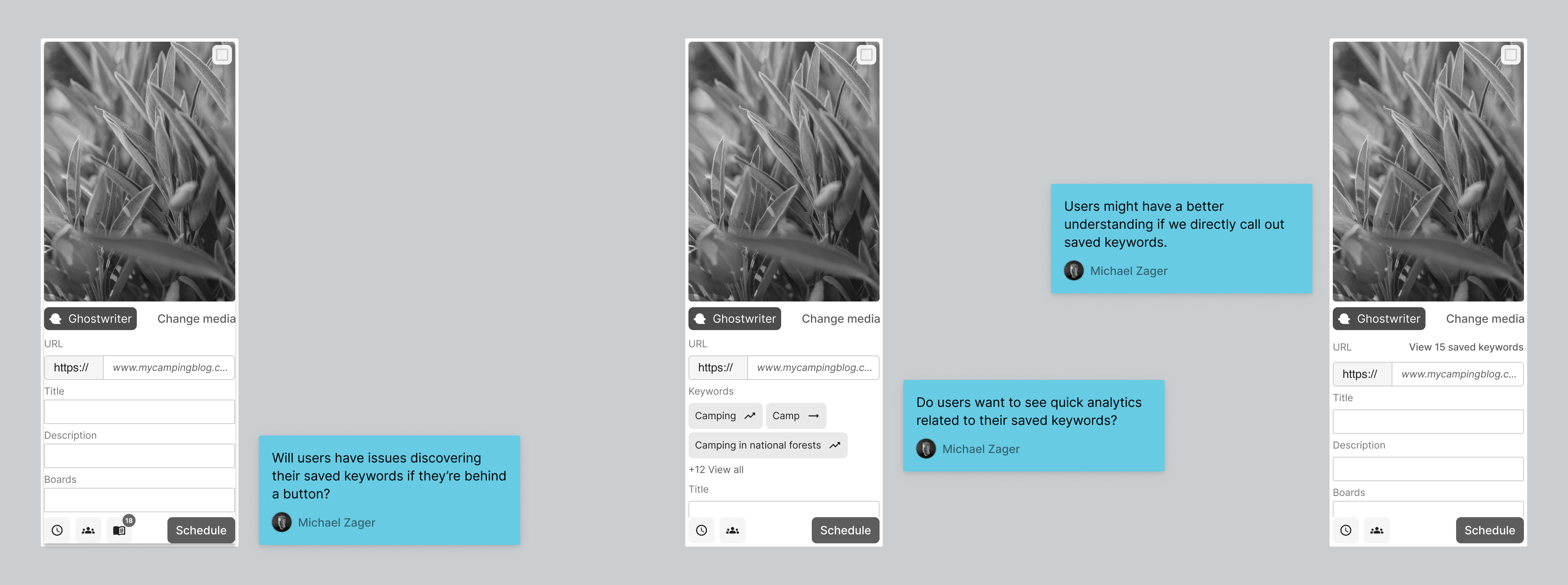
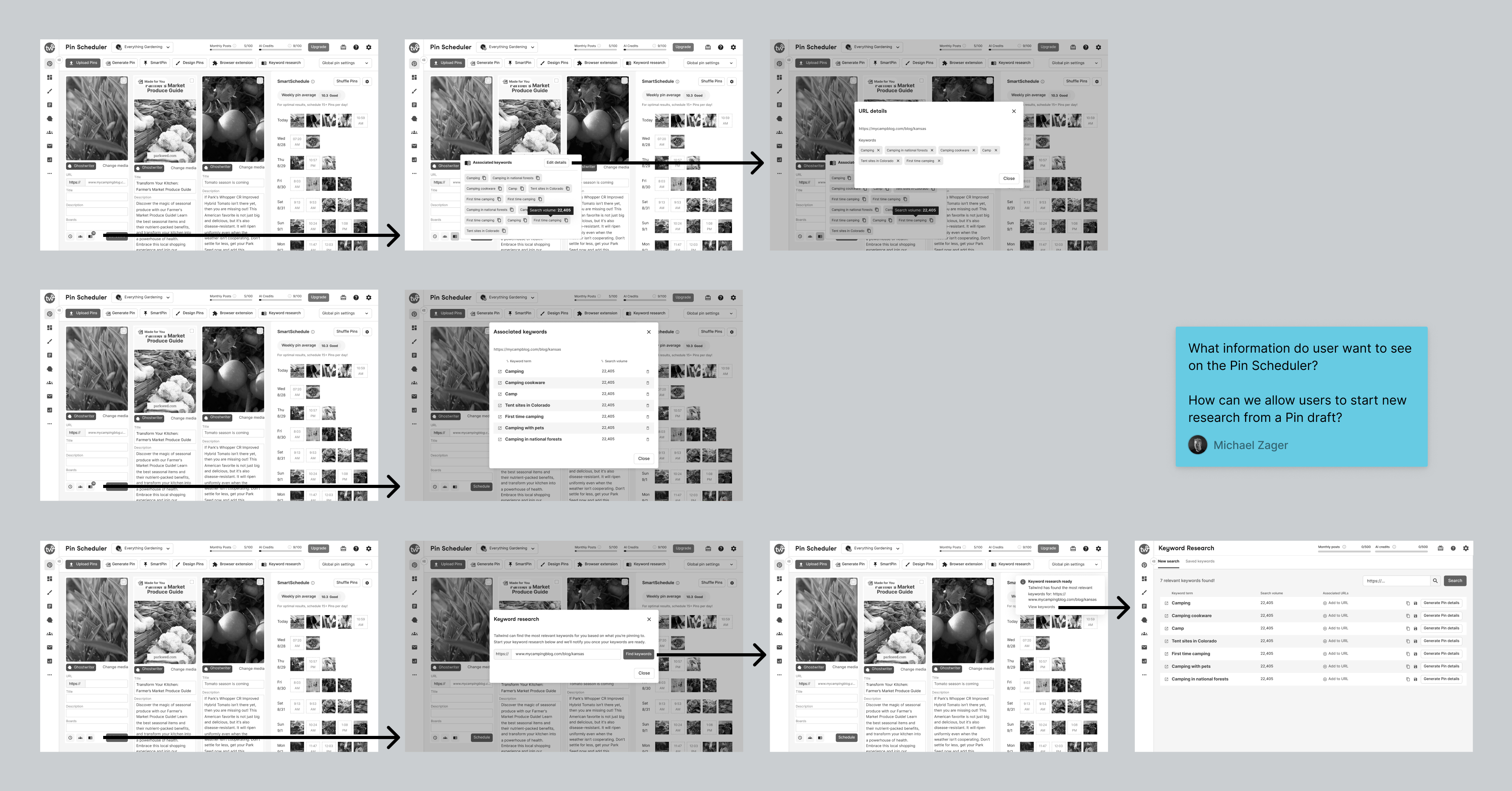
Keywords in the Pin Scheduler
Exploration for how we might show keywords on a Pin draft and integrate details related to saved keywords on the Pin Scheduler.
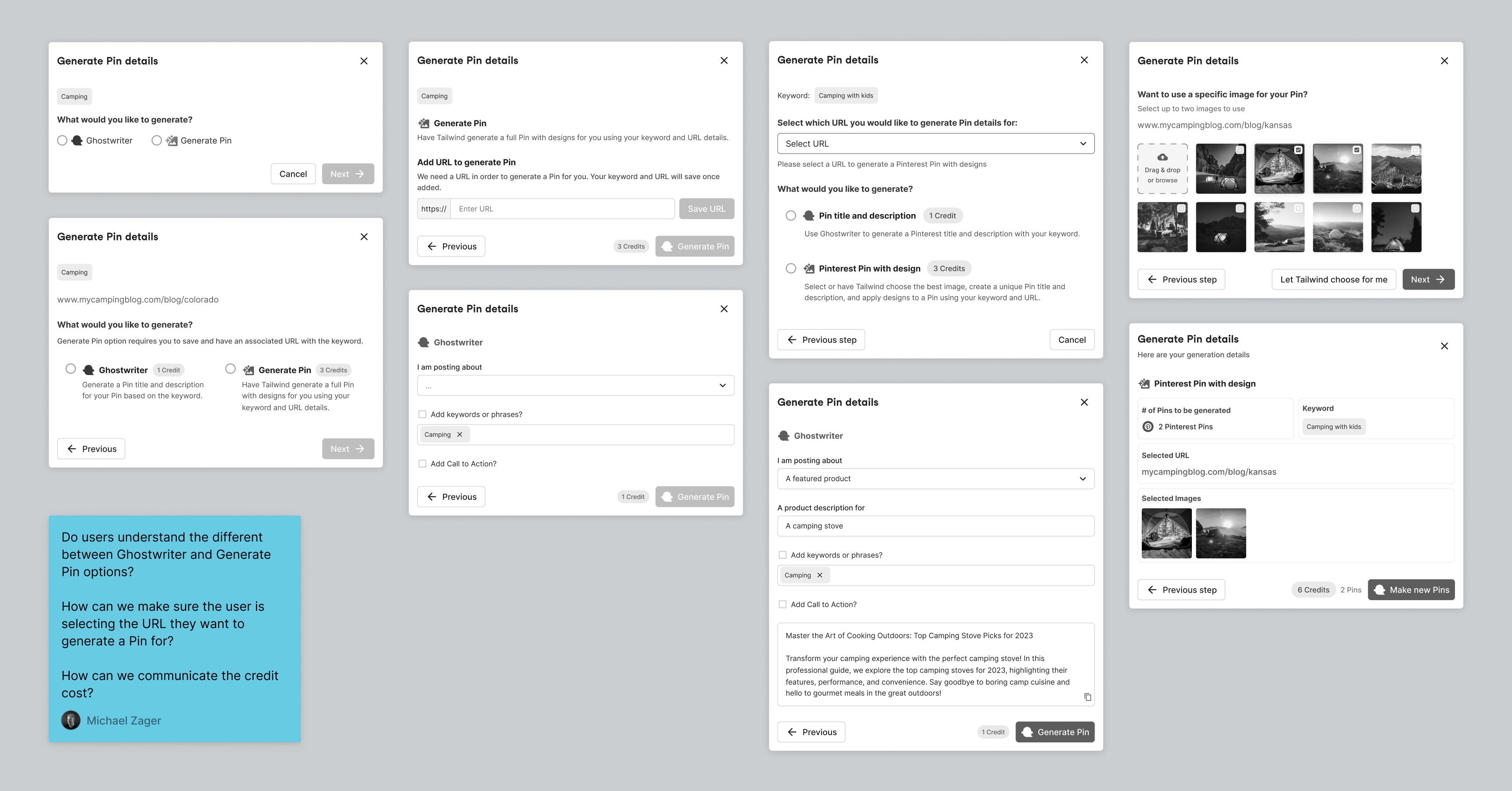
Generating Pin Details from a Saved Keyword
Modal state exploration looking at the different states a user might be in when wanting to generate Pin details from keywords.
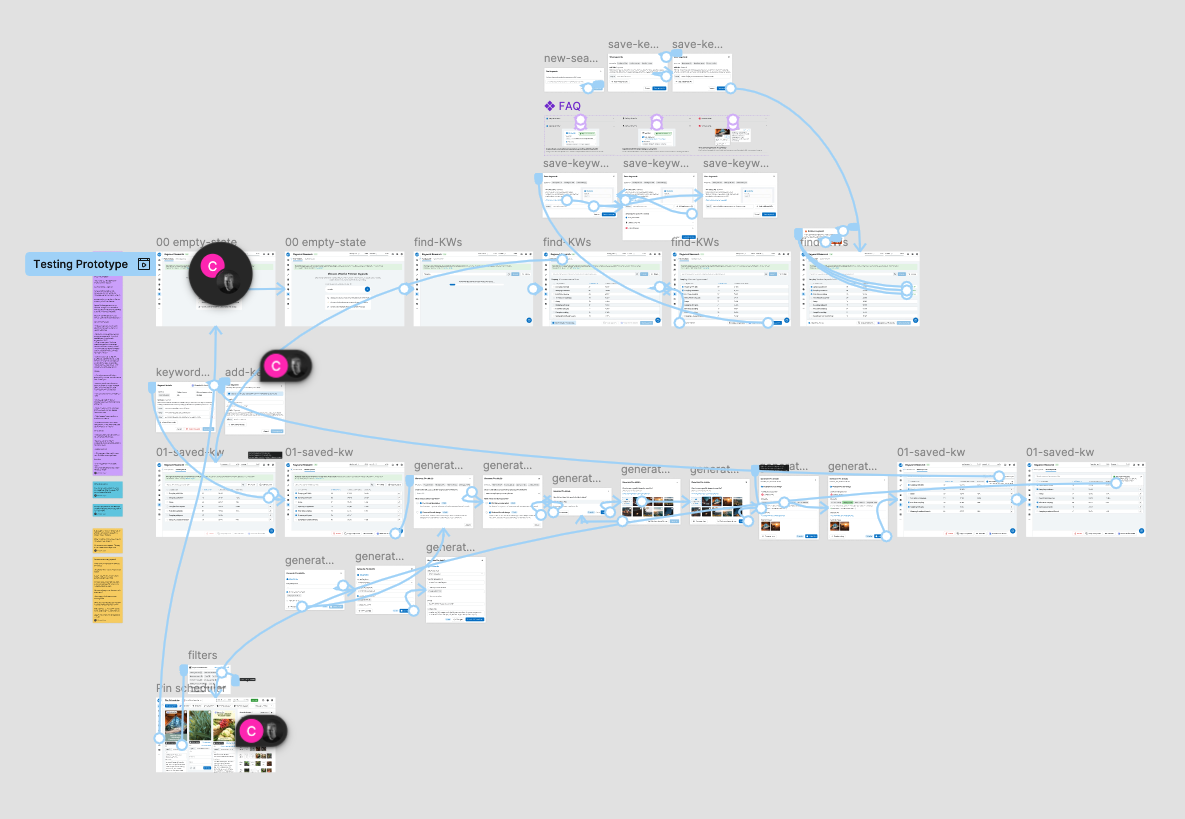
Running Usability Tests
By moving quickly, sending async video recordings, and incorporating team feedback on the fly, I built a foundational prototype we could use to gather early learnings while I continued designing other aspects of the project.
Learnings from Usability Tests
After rapid iteration, multiple prototype updates, and user interviews, three common themes emerged as sources of user confusion. Below is a closer look at these themes and how I continued iterating on solutions until feedback became more positive.
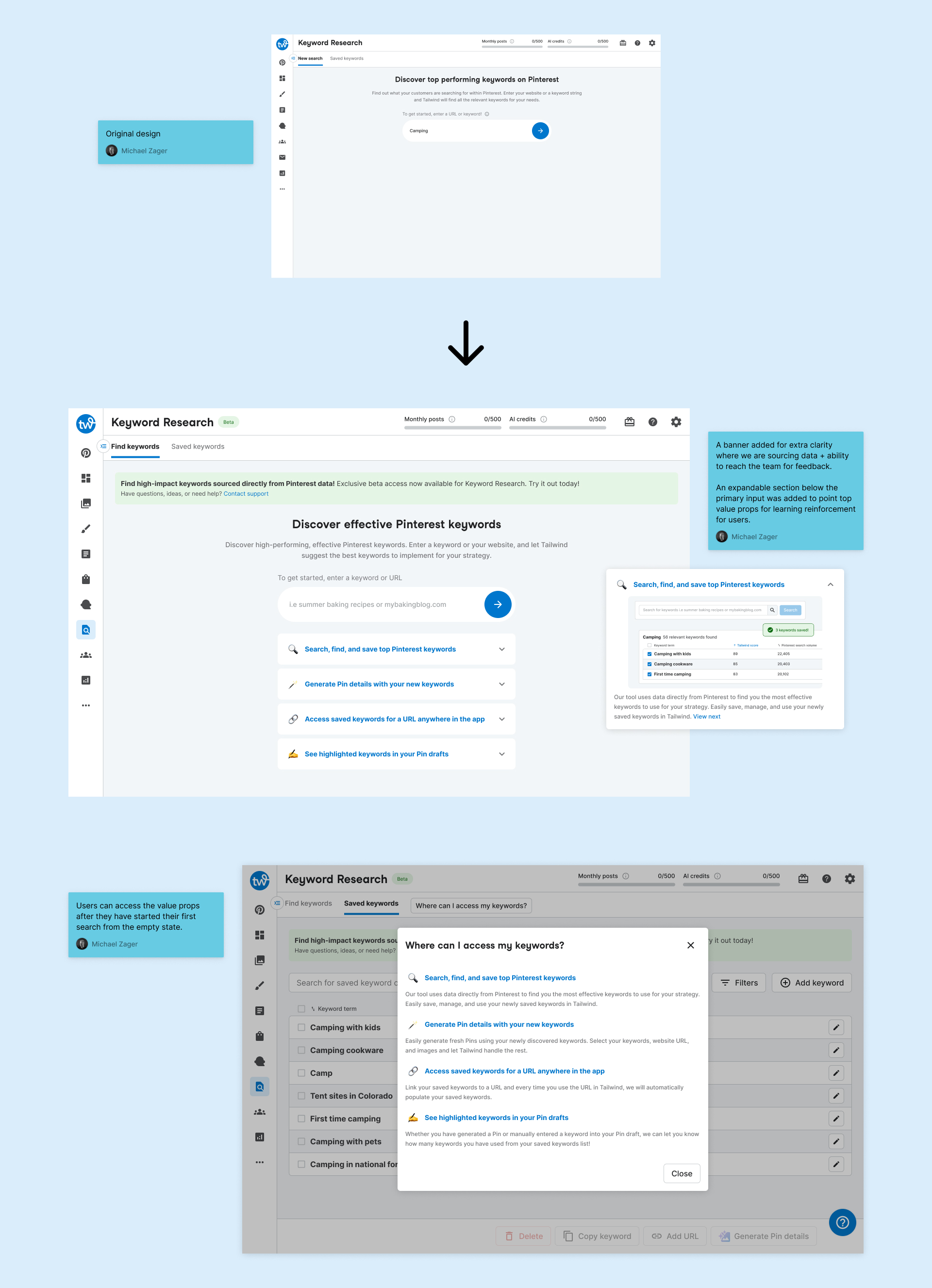
How Can We Clearly Communicate the Full Value of the Tool
User feedback / Themes:
- Testers were having trouble realizing the full power of what we were building.
- Testers were unsure exactly where Tailwind was getting the data shown with the keywords.
Improvements:
- Provide an in-line banner highlighting where Tailwind is getting data
- Introduce areas where we can communicate additional value to users. (empty state designs, quick links, and resources)
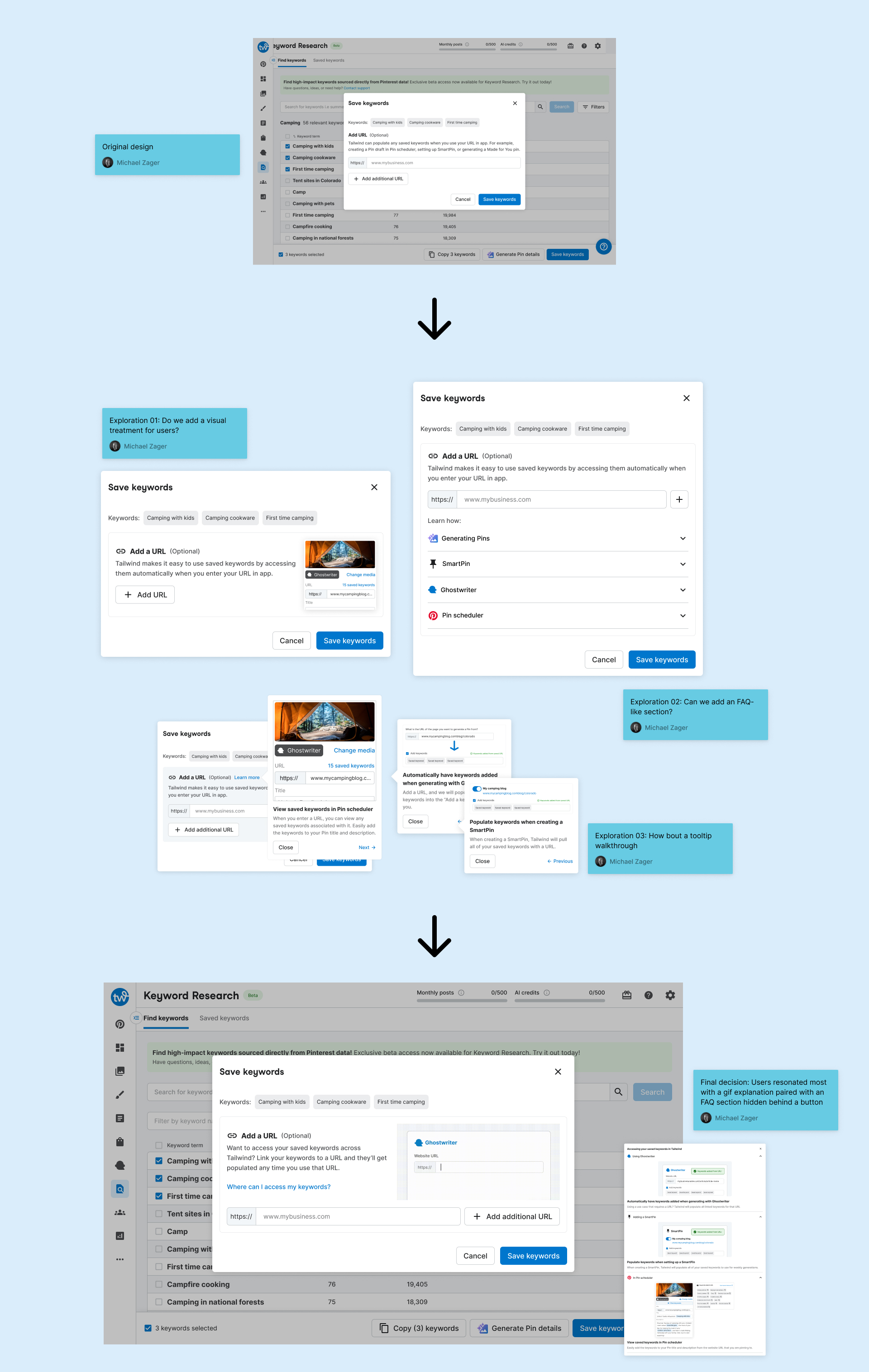
What is the Purpose of Adding a URL to a Saved Keyword?
User feedback / Themes:
- Pair your keywords with a URL.... I don’t quite understand what that means.
- I didn’t expect to be able to pair URLs with keywords. I guess I don’t know...where else I would use the keywords.
- Is this...the AI trying to incorporate keywords into the descriptions? I don’t know.
- I’m not super clear on what this part would be doing.
Improvements:
- Push language that clarifies this allows users to easily access their saved keywords across Tailwind by linking saved keywords to a URL.
- Show users where they can access their saved keywords across the app.
Improving Core Interactions and Metric Visibility
User feedback / Themes:
- Users mentioned search volume as a leading indicator of what keywords they'd like to use.
- The way I would like to work is muti-select, maybe a button that says saves keywords save them as a collection.
- Not positive on Tailwind score, I'd be looking to hover over that.
- Find keywords...didn’t you just find these for me?
Improvements:
- Allow users to save multiple keywords at a time and immediately take action (i.e generate Pin details).
- Implement clarity surrounding metrics, new search functionality, and supporting features.
Scaling Down for MVP
The team's initial plan for release was to let users search, find, save, manage, and generate keywords from the core dashboard experience. Because we prioritized business metrics and wanted to keep adding value, we decided to cut the generation flow from the MVP to move fast.
- The dev team could ship faster and save a month's worth of time to go to market.
- The dashboard addresses the core pain point by adding an external workflow into Tailwind.
- I can continue working through other aspects, like keyword research integration into our Pin Scheduler and AI-driven workflows, to iterate fast and prioritize features based on learnings from our users.
What I Learned
Iterate quick and learn fast to ship value
To continuously add value for your users and keep business metrics in sight, it is okay to cut features so long as you are addressing the core pain point. In this instance, it was cumbersome for users to search, find, and keep track of valuable keywords to use for their Pinterest Pins. By adding this ability into Tailwind, users no longer have a need to conduct this research outside of the app and can easily manage and recall their keywords regardless of where they are in Tailwind.
More Projects
